Bird Game
A small 2D platformer about a pigeon trying to find where they belong by exploring different ways of life.
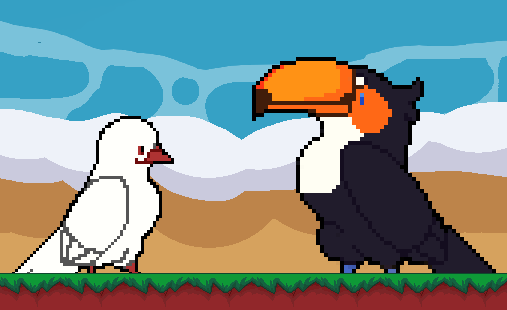
Bird Game was a first-year project that I made together with three classmates while studying CMGT at Hanze. The game combines platforming with several minigames, each representing a different way of life for the main character.
I was responsible for designing and programming one of those minigames, while also helping with the level and narrative design.
Key Features
- Designed and programmed a rhythm minigame
- Built a reusable dialogue system using arrays
- Contributed to level and narrative design
- Worked in a four-person Scrum team
- First project using GameMaker and GML
Programming
This was my first time working with GameMaker, so there was a bit of a learning curve. Once I got comfortable with GML, I started building the rhythm minigame and a simple dialogue system.
My main contribution was designing and programming the rhythm minigame. I implemented the core gameplay loop, where arrows move across the screen and the player must press the corresponding key while the arrow is inside the hit zone. A successful input destroys the note and awards points, while incorrect or mistimed inputs are ignored, or penalized if too many are missed in a row.
The dialogue system stores all dialogue in an array and moves to the next line whenever the player presses Space. It worked well for the scope of this project and was easy to expand whenever we needed more conversations, my classmates were able to use it too.
If I were to remake it today, I'd separate the input from the Space key so it would automatically work with whatever controls the player has configured.
SpacebarPressed = 0

dialogueTucan[0] = "Hey! thanks for coming \n\npress spacebar to continue"
dialogueTucan[1] = "I know you're in a bit of a tough situation"
dialogueTucan[2] = "I know something about building a nest if I do say so myself"
dialogueTucan[3] = "But before I give you some advice on how to improve on your nest"
dialogueTucan[4] = "You've gotta show me some rhythm"
dialogueTucan[5] = "Press the arrow buttons on time to score 1000 points"
dialogueTucan[6] = "Alright show me how it's done \n\npress spacebar to start"
dialogueTucan[7] = ""

dialogueTucan2[0] = "Wow you're worse than I thought!"
dialogueTucan2[1] = "..."
dialogueTucan2[2] = "Alright let me help you out"
dialogueTucan2[3] = "Don't mind those birds watching you"
dialogueTucan2[4] = "Be comfortable with your bird body"
dialogueTucan2[5] = "Now take it slow and move your body to the beat \n\npress spacebar to continue"
dialogueTucan2[6] = ""


dialogueTucan3[0] = "Alright no problem"
dialogueTucan3[1] = "Just try to get to those 1000 points \n\npress spacebar to try again"
dialogueTucan3[2] = ""

dialogueTucan4[0] = "You look amazing!"
dialogueTucan4[1] = "Now thats a bird that can dance well!"
dialogueTucan4[2] = "After those moves I will tell you my secret to a great nest"
dialogueTucan4[3] = "Eeeeverybody will love this."
dialogueTucan4[4] = "You've gotta add"
dialogueTucan4[5] = "A HAMMOCK!"
dialogueTucan4[6] = "Those things are AMAZING!"
dialogueTucan4[7] = "I handcrafted this one myself. Brazilian style!"
dialogueTucan4[8] = "Here you go"
dialogueTucan4[9] = "See you later!"
dialogueTucan4[10] = ""
This project taught me more than just GameMaker. It was my first experience working in a Scrum team, planning work together and communicating through sprints. Having everyone regularly discuss progress made it much easier to stay organised and avoid stepping on each other's work.
Looking back, there are definitely things I'd build differently now, but this project gave me a solid introduction to both GameMaker and working in a team.