FPS Leveling & Upgrade System
A modular leveling and diegetic upgrade system built inside Unity's FPS Microgame, where players earn XP from enemies and spend it at an in-world terminal to unlock upgrades.
For this project I built a leveling system for Unity's FPS Microgame, aiming for a diegetic upgrade terminal, one that exists inside the game world rather than in a separate menu, inspired by Dead Cells. The goal was to make something modular enough to grow with new upgrades later, without needing a rewrite.
Key Features
- Extended an Existing Unity Codebase
- Designed Systems Using UML
- Implemented a Diegetic Upgrade System
- Developed a Reusable Interaction System
System Overview
Players earn XP by defeating enemies, scaled to each enemy's health, so the same formula works across enemy types. They can then spend it at a terminal for upgrades.
- Max Health Upgrade, purchasable infinitely, cost scales up each time
- Max Ammo Upgrade, purchasable infinitely, cost scales up each time
- Jetpack, a one-time unlock enabling vertical movement
Design
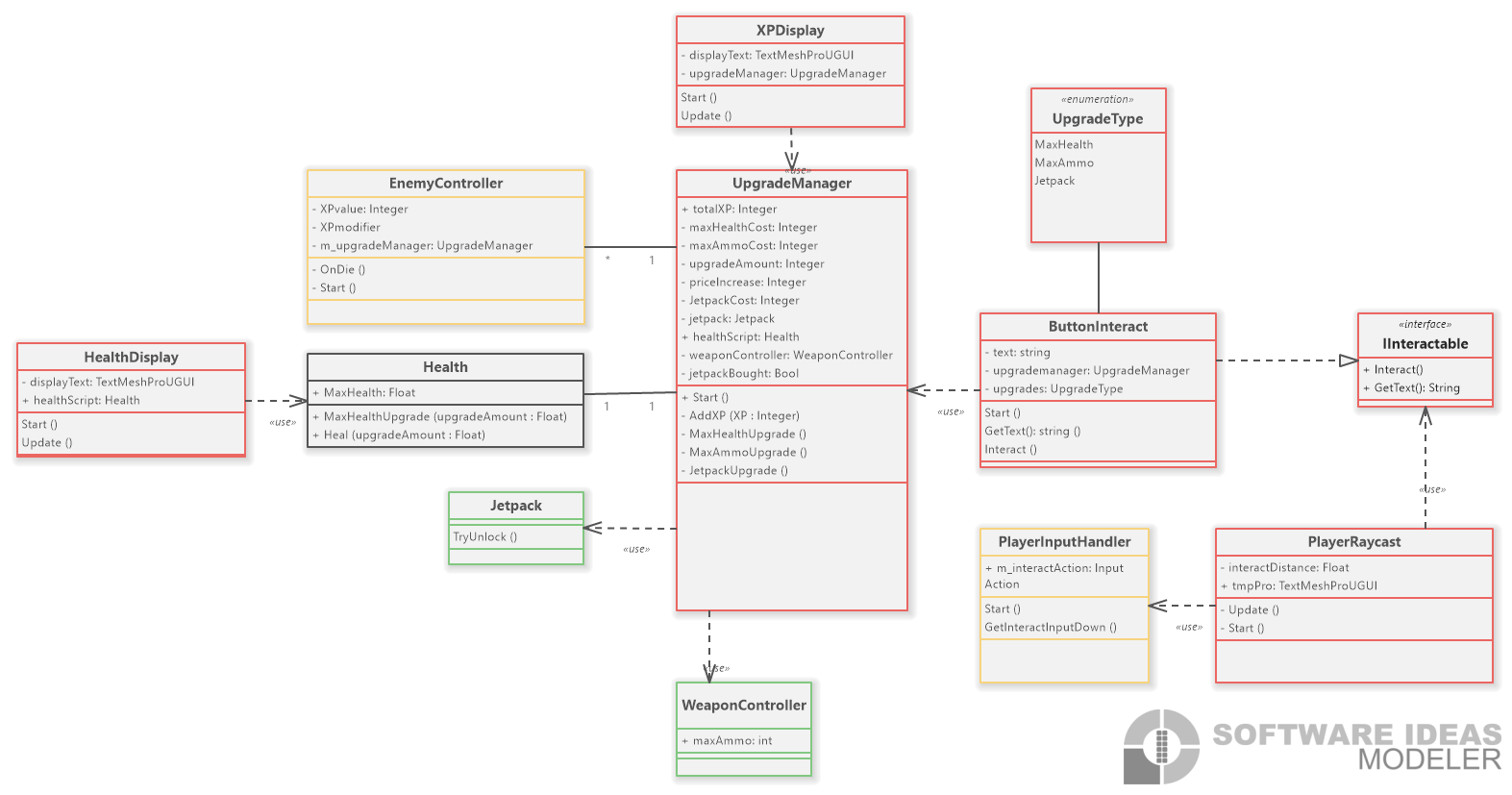
I mapped the whole system in a UML diagram covering the player, enemies, the upgrade manager, and the raycast/interface layer that connects them, which made it much easier to plan how the system could expand later.
Gaining XP & Assembly Definitions
On death, an enemy's XP value is sent to the UpgradeManager and added to the player's total, which the XPDisplay reads and shows on screen in real time.
This is also where I ran into assembly definitions: EnemyController couldn't reference UpgradeManager without one. Rather than reorganizing every script into folders, I created a single assembly definition for my own scripts, enough for a project this size, even though I know they matter more as a project grows.
Button Interaction & Interfaces
Diegetic menus almost always rely on raycasting for interaction. My first attempt just raycast to a button and interacted on a key press, but the key didn't work. It turned out the project used the newer Input Actions system, so I added a dedicated interact action to get the raycast working properly.
private void Update()
{
        Ray ray = new Ray(transform.position, transform.forward);
        RaycastHit hit;

    tmpText.text = "";

    if (Physics.Raycast(ray, out hit, interactDistance)) //check if ray hits within interact distance
    {
        IInteractable interactable = hit.collider.GetComponent<IInteractable>(); //check if the object hit with raycast is using the interface

        if (interactable != null)
        {
            tmpText.text = interactable.GetText();

            if (m_inputHandler.GetInteractInputDown())
            {
                interactable.Interact(); //start interact() on object hit
            }
        }
    }
}
To keep the system scalable, I wanted one script to drive multiple buttons rather than duplicating logic. That's what led me to interfaces, an IInteractable interface meant any object the raycast hits, whether a button, a door, or a collectible, just needs to implement Interact().
public interface IInteractable
{
    void Interact();
    string GetText();
}

public class ButtonInteract : MonoBehaviour, IInteractable
{
    [SerializeField] private UpgradeType upgrade;
    [SerializeField] private UpgradeManager upgradeManager;

    public string GetText() => $"Buy {upgrade}";

    public void Interact()
    {
        switch (upgrade)
        {
            case UpgradeType.MaxHealth: upgradeManager.MaxHealthUpgrade(); break;
            case UpgradeType.MaxAmmo:   upgradeManager.MaxAmmoUpgrade();   break;
            case UpgradeType.Jetpack:   upgradeManager.JetpackUpgrade();   break;
        }
    }
}